Free everyday 3D prints: spinners, oil tag, bookmark, puppy
Four free, print-ready 3MF models for home and everyday use: five fidget spinners, an oil change tag, a UFO bookmark and a small puppy. No supports needed.
This collection is four free, print-ready 3MF models from 3DX.info on MakerWorld, eight designs in all: a pack of five press-fit fidget spinners, an oil-can tag that reminds you when the next oil change is due, a UFO bookmark and a 4 cm sitting puppy. None of them needs supports, all use a 0.4 mm nozzle, and each 3MF carries its print profile, so you can send it straight to the printer.
Each model below lists its layer height, walls, infill, filament amount and color notes as given on its MakerWorld profile. Two things are worth knowing before you start: the spinners need their default 0.2 mm layer height for the press fits, and the oil tag is the only model that really cares about heat, because it lives in a car. The tag section and the material table cover that.
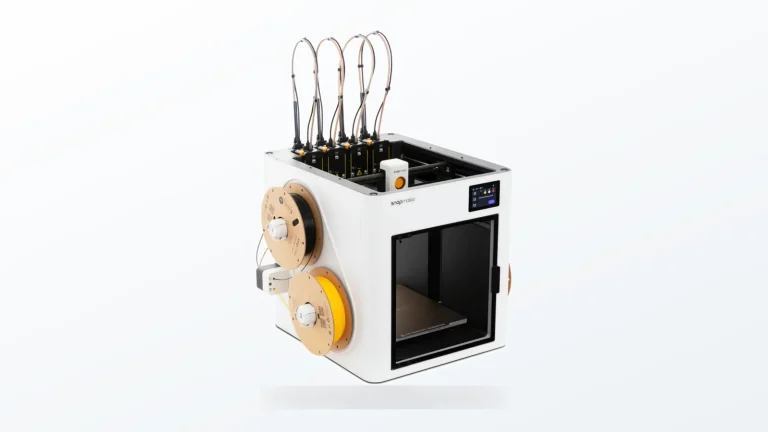
The consumer toolchanger 3D printer: the SnapSwap 4-toolhead system swaps heads in 5 seconds for true multi-color and multi-material printing, with smart calibration and auto filament loading.
- 4 toolheads · 5 s swap
- Up to 500 mm/s · 20,000 mm/s²
- 270 mm cube build volume
- Multi-color & multi-material

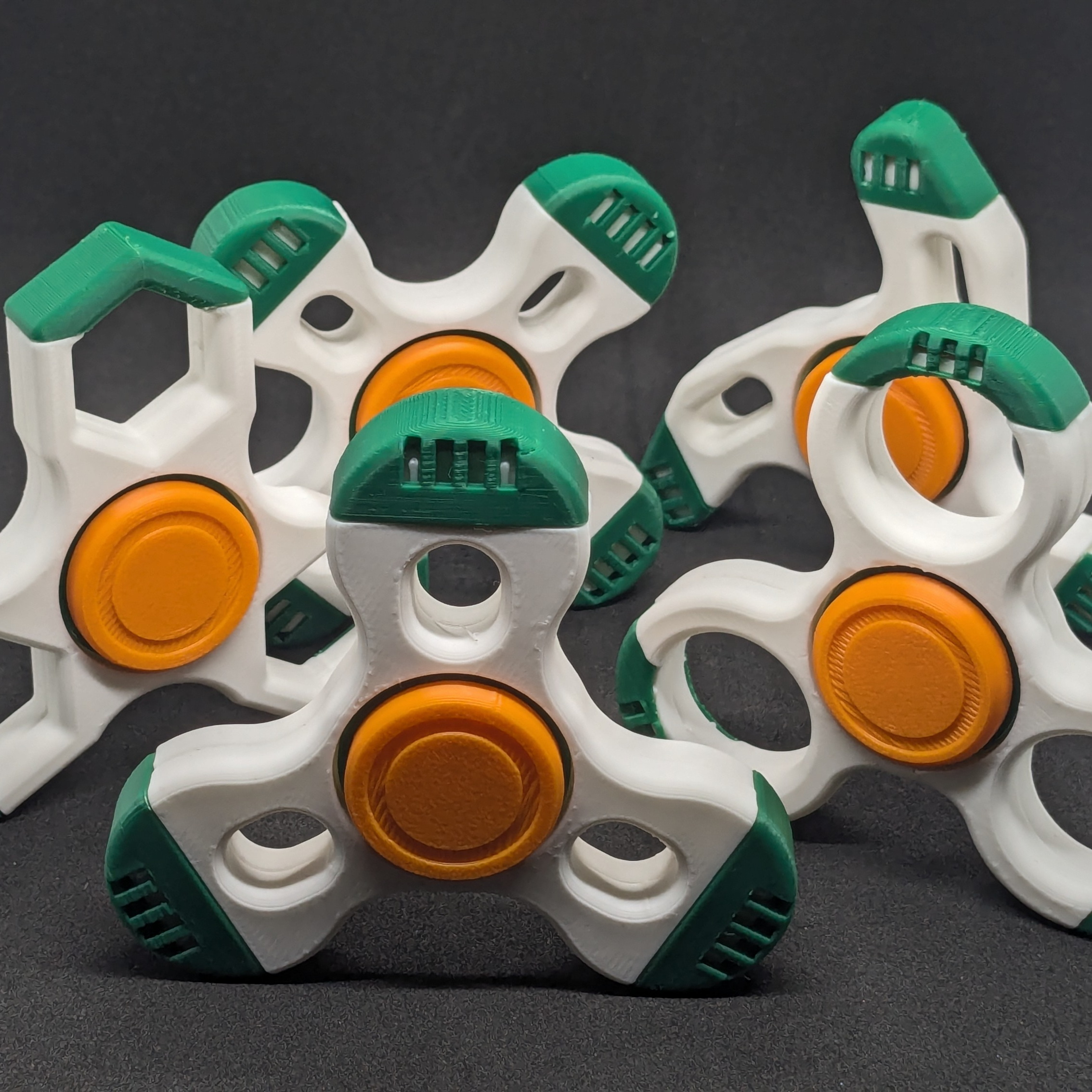
- Fidget spinner pack: five designs, no glue, no bought bearings
- Oil service tag: oil-can reminder with date, mileage and oil-type fields
- UFO in the Mountains bookmark: 1.2 mm thin, printed at 0.08 mm layers
- Cute puppy figurine: 4 cm desk ornament
Print settings for all four models
Values come from each model’s MakerWorld profile. “Not stated” means the page does not give it.
| Model | Layer height | Walls / infill | Filament | Colors | Supports |
|---|---|---|---|---|---|
| Fidget spinner pack (5 designs) | 0.2 mm | Not stated | PLA or PETG; grams per spinner not stated | 3 (AMS optional) | None |
| Oil service tag | 0.16 mm | 2 / 15 % | About 12 g | 2: white, then red from layer 20 | None |
| UFO bookmark | 0.08 mm | 2 / 15 % | About 13 g | Black and white in the photos | None |
| Cute puppy figurine | 0.16 mm | 2 / 15 % | About 11 g | 1 in the photos | None |
The spinner 3MFs come with plates for a 180 mm bed (A1 mini size) and a 256 mm bed (A1, P1, X1).
Fidget spinner pack: five designs, no glue, no bearings
The pack has five outlines, Aero, Hexa, Orbit, Xframe and Dual, built around one shared center mechanism. The bearing is printed too: a barrel bushing rides on a 9.5 mm axle over a narrow contact band, and two bushings pressed into each other clamp the body halves like a rivet. Nothing needs glue or hardware, and there are no thin snap tabs to break.
Assembly is a series of press fits:
- Print two body halves. Aero, Hexa, Xframe and Dual use one file twice; Orbit has swept arms, so its second half is a separate mirrored part. Both are already on the plate.
- Press the clamp bushing into the bore, then press the bearing insert into it from the other side.
- Press an arm cap onto each arm tip.
- Push the axle through the center and press the cap onto its 5 mm peg.
- Spin it. The model page says the fit beds in after a few turns.
Print notes. No supports; every part lies flat. The tall, small arm caps ship with a 3 mm outer-only brim, and the page says to keep it because they pop off a bare plate; it peels off by hand. PLA is enough, and PETG is reported to give a slightly smoother spin. Keep the 0.2 mm layer height, because the press fits were set for it and other heights may change how they feel. If parts bind, check your first-layer squish (see first layer calibration) and your extrusion with flow rate calibration; oversize plastic is a common cause of tight press fits.
Color with or without an AMS. Each single-spinner 3MF has four plates. Plate 1 prints the whole spinner in color with three filaments mapped to AMS slots; plates 2 to 4 split the same set into one color per plate. Printing the single-color plates one after another is faster, because the printer never switches filament mid-print and there is no purge tower. Without an AMS, print each color from its own plate and swap the spool between plates.
Download the fidget spinner pack on MakerWorld
Oil service tag: a reminder that hangs in the car
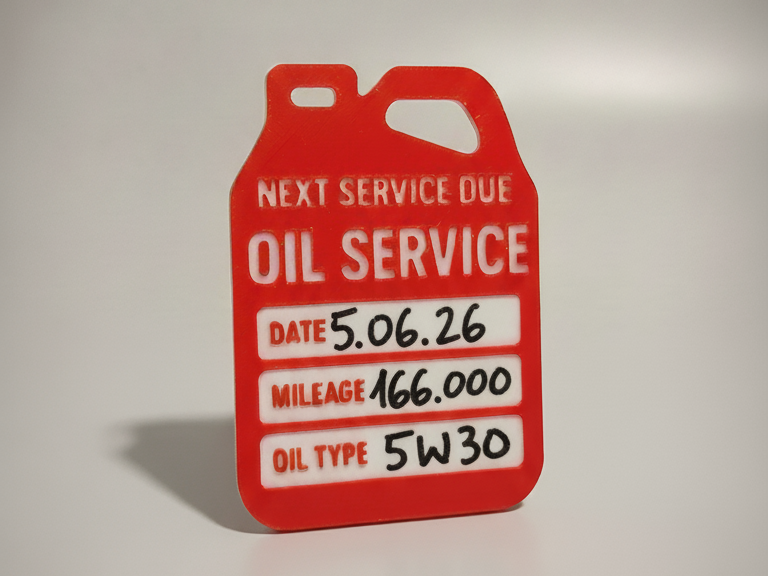
The tag is shaped like a can of motor oil, with “Oil service / next service due” across the top and three white fields underneath: date, mileage and oil type. A hanging hole is built into the can handle, so it fits a rearview mirror, a spot under the hood or a garage shelf. Fill the fields in with a permanent marker or paint pen, as in the photo.
Settings. 0.16 mm layers, 0.4 mm nozzle, 2 walls, 15 % infill, about 12 g, no supports, printed flat. The model page sets the color change from white to red at layer 20. With 0.16 mm layers that is roughly 3.2 mm up, but your first-layer height may shift it by a layer, so check the slicer preview. Without an AMS, use the pause method in the two-color section below.
Material for a hot car. The page lists PLA or PETG. A parked car heats fast: the US National Weather Service in Louisville reports that cabin temperature rose 19 °F in 10 minutes and 34 °F in 30 minutes on average. That is air temperature, and a tag hanging in direct sun can be hotter than the air around it. Prusa’s data sheets list a heat deflection temperature of 55 °C for Prusament PLA and 68 °C for Prusament PETG, so the PETG version has more margin on a summer day. Those figures come from a lab test under load and are not a guaranteed safe limit. For the trade-offs between the two, see PLA vs PETG, and for prints that sit in sunlight read UV-resistant outdoor prints.
Download the oil service tag on MakerWorld
UFO in the Mountains bookmark
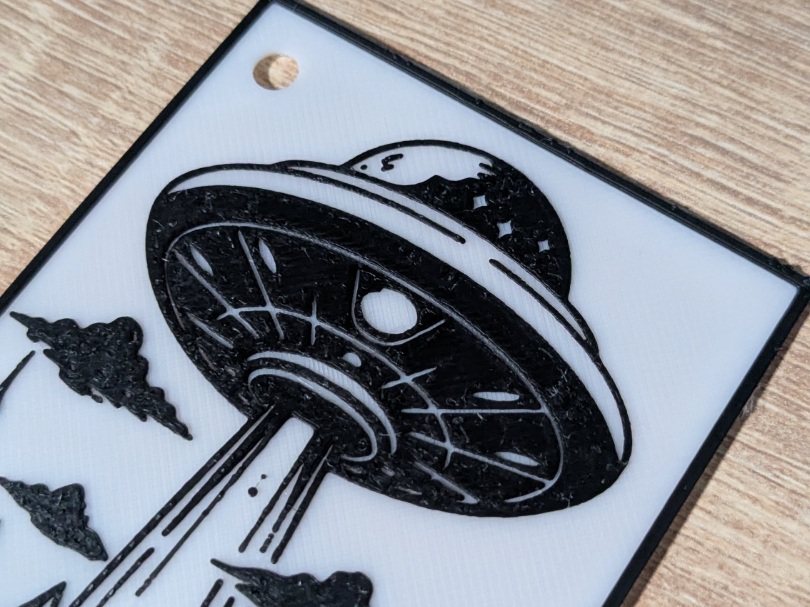
A flying saucer in a beam of light hovers over a mountain landscape, drawn as monochrome line art in the style of a tattoo. The bookmark measures 138.4 × 65 mm and is only 1.2 mm thick; the page calls it thin and flexible, so it should slide between pages without marking them. A small hole at the top takes a ribbon or tassel.
Settings. 0.08 mm layers, 0.4 mm nozzle, 2 walls, 15 % infill, about 13 g, no supports. At 0.08 mm the 1.2 mm thickness works out to about 15 layers, and the fine layers are what keep the line art crisp. The photos show black art on white; the page does not say how many filaments the 3MF uses, so open its filament list and layer preview in the slicer to see the color setup. A bookmark is mostly first layer, so level the bed carefully and read first layer calibration before you print a stack of them.
Download the UFO bookmark on MakerWorld
Cute puppy figurine
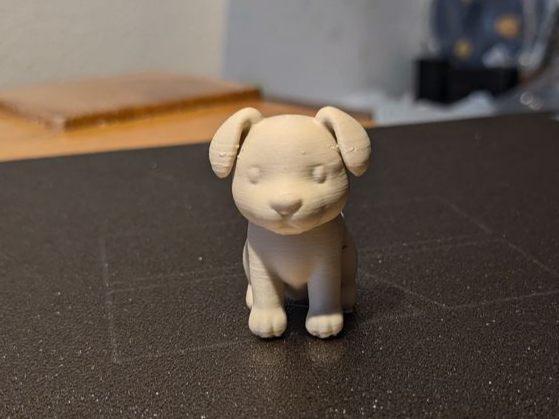
A sitting puppy with a round head, floppy ears and a friendly pose, 4 cm tall, meant for a desk, a shelf or as a small gift. It prints in one piece and the photo shows a single color, so a light paint job is the easy way to add detail.
Settings. 0.16 mm layers, 0.4 mm nozzle, 2 walls, 15 % infill, about 11 g, listed as no supports. Rounded heads and ears show layer lines first, so keep the 0.16 mm layers if you want it smooth. The page calls it kid-friendly because of its rounded edges. We make no child-safety claim: at 4 cm it is a small part, so keep it away from toddlers and do not treat a printed figure as a toy tested to any standard.
Download the puppy figurine on MakerWorld
Two-color prints without an AMS
The oil tag, and the spinners if you have no AMS, need a color swap mid-print. The method is the same everywhere: schedule a filament change at a layer, the printer pauses, you swap the filament, and it carries on.
| Slicer | How | Documented in |
|---|---|---|
| PrusaSlicer | Drag the layer slider to the target layer, then click the orange plus icon (right-click to choose a color). The G-code gets an M600 command, so the printer pauses and prompts you. | Prusa Knowledge Base |
| Cura | The built-in Filament Change post-processing script: enter the layer number from the Cura preview (several, separated by commas); the change happens at the start of that layer. | Script source in the Cura repository |
| Bambu Studio, OrcaSlicer | We could not confirm a pause-at-layer procedure in their official docs. Check the current docs for your version before relying on one. | Not verified |
Prusa’s advice applies to every method: use filaments of the same type, PLA with PLA or PETG with PETG, because different materials adhere badly and the print will most likely fail. The Cura script also lets you set the retraction and choose between the Marlin and RepRap M600 variants, or use your firmware’s own settings. For other ways to get colored prints, from toolchangers to an AMS, see multi-color printing technologies.
Small flat parts and the first layer
Most of these models are a few millimeters of plastic on the bed, so the first layer decides the result. A few habits help:
- Check squish before a batch. A nozzle set too high can leave thin parts like the bookmark rough or lifting; too low can bulge the underside, which can tighten the spinner bushings.
- Keep the brim on the spinner arm caps. It is part of the file. For other tall, small-footprint parts, read brim vs raft for width and gap.
- Keep the file’s layer height. The spinners and the bookmark were set up for 0.2 mm and 0.08 mm; changing them changes fit and detail.
Material choice at a glance
| Model | PLA | PETG | Notes |
|---|---|---|---|
| Fidget spinner | Fine; the page says PLA is plenty | Reported slightly smoother spin | Keep 0.2 mm layers |
| Oil service tag | Heat deflection 55 °C (Prusament data sheet); soft in a hot cabin | Heat deflection 68 °C (Prusament data sheet); more margin | Out of direct sun if you can |
| UFO bookmark | Material not stated on the page | Material not stated on the page | Thin; keep 0.08 mm layers |
| Puppy figurine | Fine; the page says PLA or any standard filament | Not stated | Painting is optional |
Frequently asked questions
Do these models need supports or an AMS?
No supports for any of them, and no AMS. The spinners include single-color plates you print one at a time, and the oil tag needs one manual filament swap at layer 20, which you can do with a slicer color change and a pause. An AMS only saves you the swapping.
Will the oil tag survive in a hot car?
PLA is the weak point. Prusa lists a heat deflection temperature of 55 °C for its PLA and 68 °C for its PETG, and a parked car heats quickly above the outdoor air temperature. Print the tag in PETG and keep it out of direct sun where you can; neither material is guaranteed in an engine bay.
Can I change the layer height of the spinners?
It is better not to. The model page sets 0.2 mm and the press fits are built around it, so another height may make the bushing and axle tighter or looser. If you want a smoother spin, the page suggests PETG at the same 0.2 mm.
How do I get two colors without a multi-material unit?
Add a color change or pause at the target layer in your slicer, then swap the filament when the printer stops. In PrusaSlicer this is the plus icon on the layer slider, which inserts M600. Use the same material type for both colors.