Toolchangers used to be the domain of people who build their own printers: a Prusa XL if you had the budget, an E3D motion system if you had the patience. Snapmaker’s pitch with the U1 is that the same idea, four independent toolheads swapped mechanically instead of one nozzle purging its way through every color change, can ship as a boxed consumer product with a list price under $1,000. Snapmaker sponsored this overview and the links go to its store (details at the end), so it is worth separating what the machine demonstrably does from what the marketing claims and what only long-term use will settle.
What the U1 actually is
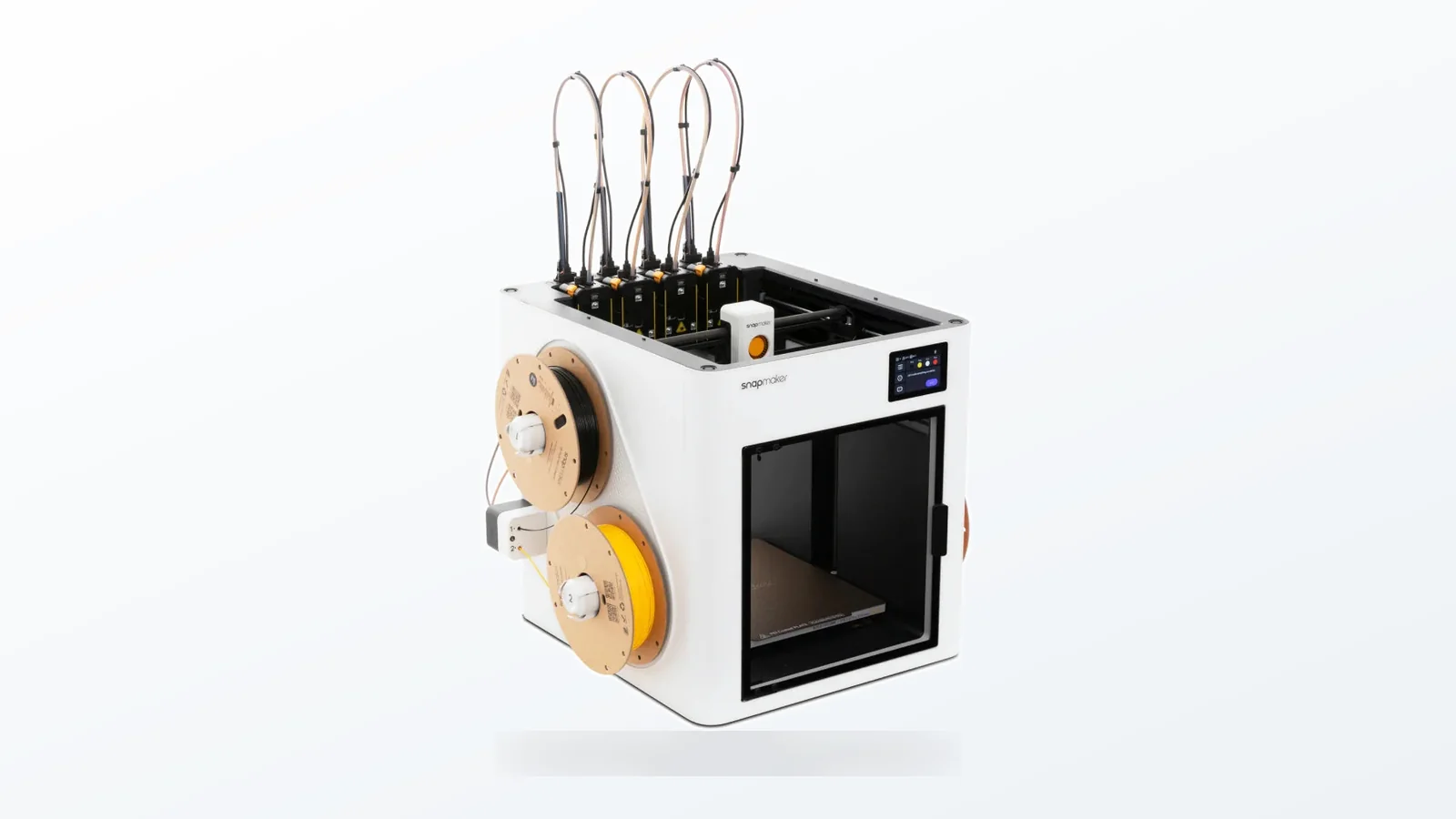
The Snapmaker U1 is a CoreXY desktop FDM printer with a 270 × 270 × 270 mm build volume and a four-slot toolhead dock across the back of the gantry. Each dock holds a complete toolhead with its own hotend and extruder. When a print calls for a different material or color, the carriage parks the current head, picks up the next one and continues. Snapmaker calls the mechanism SnapSwap and quotes a swap time of about five seconds.
That single design decision is the whole story. Nearly every other multi-color desktop printer in this price bracket uses one nozzle fed by a filament switcher, so each change means retracting one filament, loading the next and purging the old material out of the melt zone. The U1 does not purge between colors because each color has its own nozzle. It also means four filaments of genuinely different chemistry can share one print, which a single hotend running at one temperature cannot do well.
SnapSwap: four toolheads instead of one
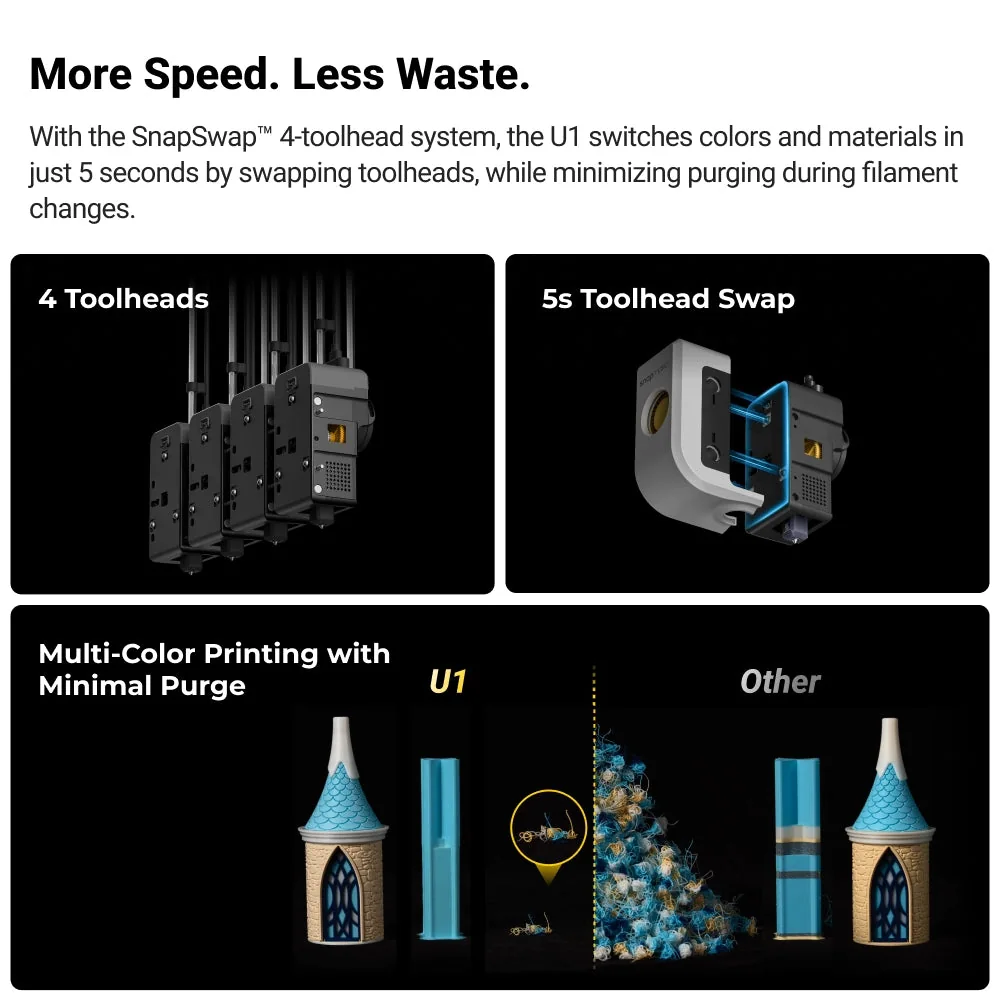
Mechanically, each toolhead docks on a fixed cradle and is picked up by the carriage with a locking coupling; the feed tube for each head runs from its own spool holder on the side of the machine, so filament is always loaded and pre-positioned rather than being shuttled through a shared path. Four toolheads ship in the box, which is the entire capacity of the system, so there is no expansion path to a fifth or sixth head. For most hobby and prosumer work, four is the practical ceiling anyway: a body color, an accent, a soluble support material and a flexible or engineering filament covers the majority of real jobs.
The trade-off is straightforward. Four hotends are four nozzles to keep clean, four sets of consumables and four heaters to calibrate against one another. Snapmaker addresses the calibration part with automation, discussed below, but the maintenance part is inherent to the concept, and anyone coming from a single-nozzle machine should budget for it.
Where the “5X faster, 5X less waste” claim comes from
Snapmaker’s headline numbers, up to five times faster with up to five times less waste, are comparisons against single-nozzle multi-color systems, not against single-color printing. The logic holds: a purge-based system may flush several grams of filament on every change, and a detailed multi-color model can involve hundreds of changes per print. A toolchanger skips the purge entirely and only needs a short prime, so both the waste pile and the time spent producing it shrink dramatically. How close a specific print gets to the 5X figure depends on how many color changes it has; a two-color keychain will not show the difference, a six-hundred-change lithophane box will. Treat the multiplier as Snapmaker’s best case, but the direction of the advantage is not in dispute. If you want to understand how much a purge tower actually costs on a conventional setup, our guide to reducing multi-material waste through purge tower optimization walks through the numbers.
Multi-material, not just multi-color
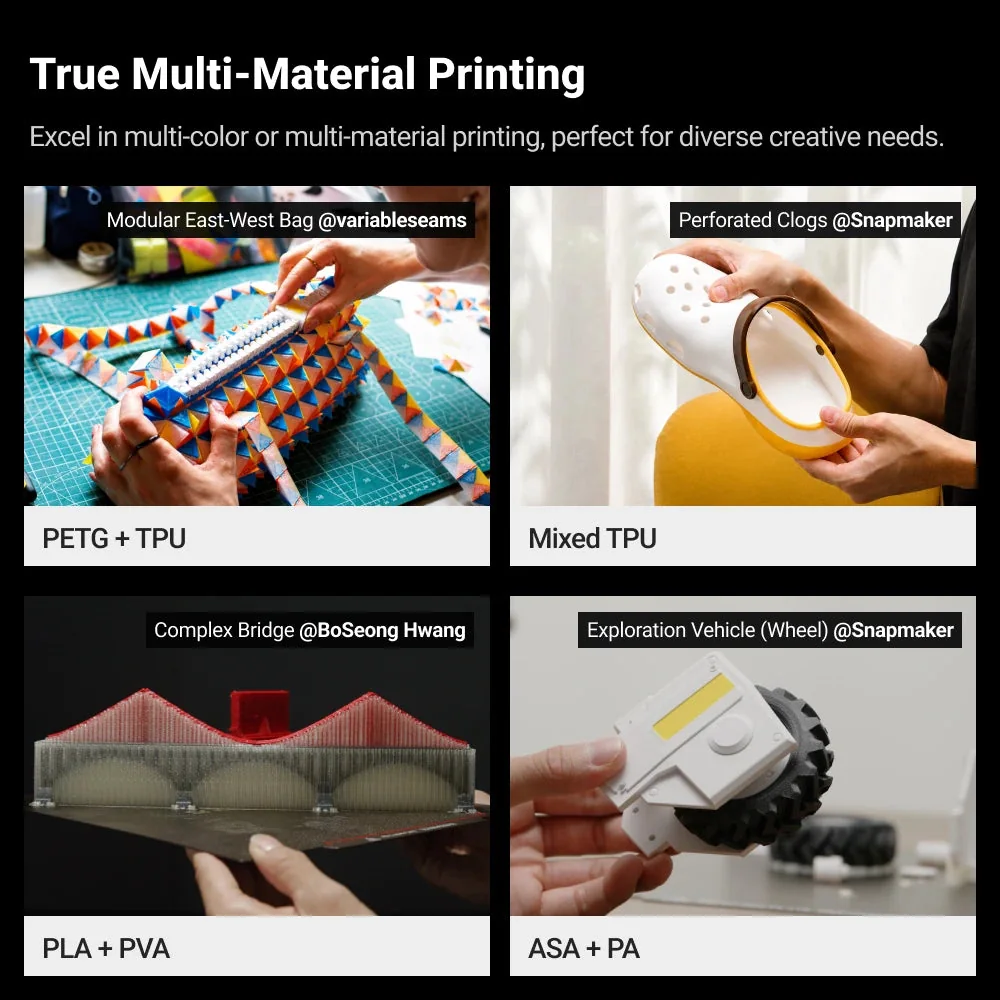
The more interesting use of independent hotends is material pairing. Snapmaker’s own examples are PETG bodies with TPU inserts, mixed-hardness TPU parts, PLA models on PVA soluble supports and ASA structural parts with nylon (PA) wear surfaces. Each pairing runs on a single-nozzle machine only with compromises, because the nozzle temperature and the purge behaviour have to be tuned for both materials at once. With a dedicated hotend per material, each head runs its own temperature, its own retraction and its own pressure advance profile, and the filaments only meet on the part.
Soluble supports are the quiet win here. Dissolvable interfaces make overhangs and internal channels printable without the scarring left by breakaway supports, and the U1 removes the usual PVA headache of purging a hygroscopic, sticky material through the same nozzle as your PLA. We have covered the compatibility side of this in our multi-material material selection guide; the U1 does not change which materials bond to each other, it just removes the nozzle as the bottleneck.
Speed and motion: CoreXY at 500 mm/s
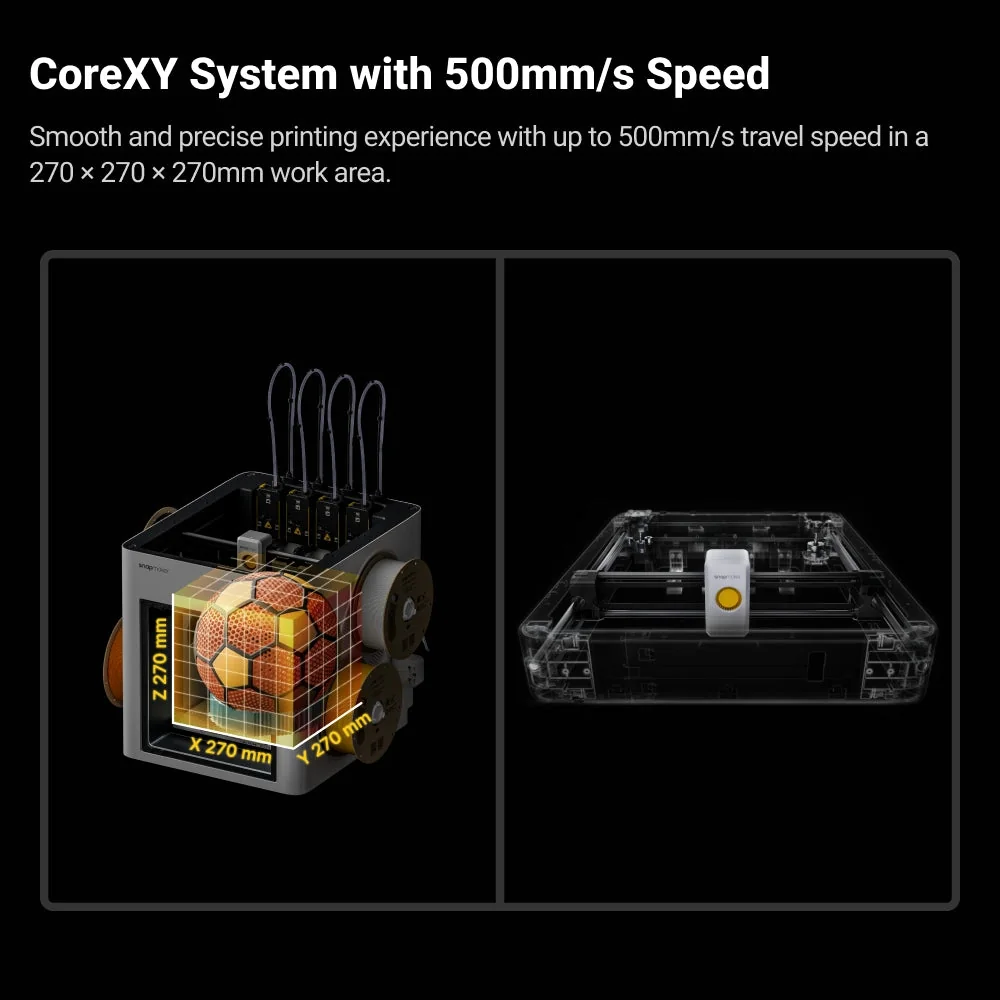
The motion system is a conventional CoreXY layout with quoted maximums of 500 mm/s travel and 20,000 mm/s² acceleration, which puts it in the same class as the current generation of fast enclosed printers. Snapmaker pairs the motion system with input shaping and vibration compensation, so the acceleration figure is usable rather than theoretical. Whether you print at those speeds is a separate question: quality-focused PLA work still tends to sit in the 150 to 250 mm/s range on any machine, and the value of a fast motion system is mostly that travel moves, toolhead trips to the dock and infill do not eat the time saved by skipping purges.
The frame is open at the top by default. Snapmaker sells a top cover as an option and explicitly ties it to “high-temperature engineering materials”, which is the honest way to say that ABS, ASA and nylon will want the cover on to avoid warping and to keep fumes contained. If those materials are the reason you are looking at a toolchanger, factor the cover into the price. Our guide to enclosures for high-temperature filaments explains why the difference matters.
Calibration that does not need you
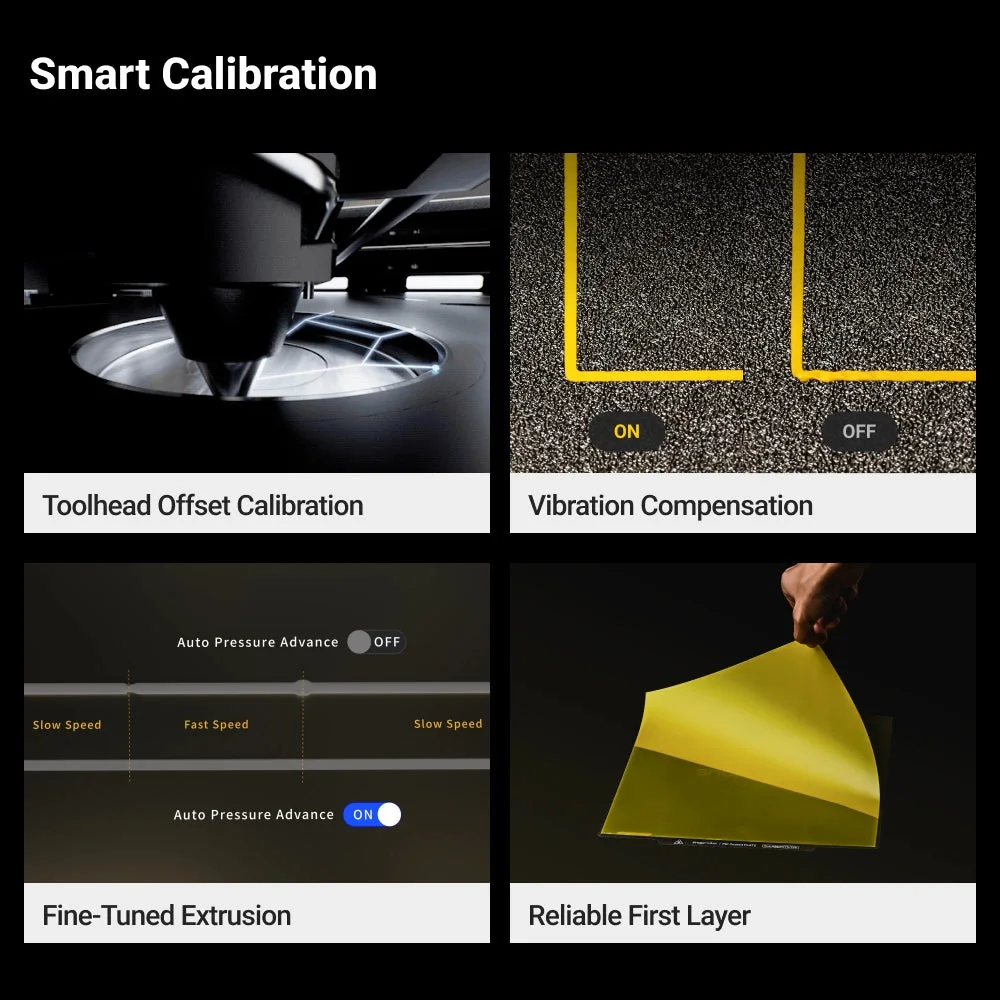
A toolchanger lives or dies on offsets. If head two is 0.05 mm to the left of head one, every color boundary on the part shows it. The U1 measures toolhead XY offsets automatically, which is the feature that turns a toolchanger from a hobbyist project into an appliance; on older systems this was a print-measure-adjust loop that had to be repeated whenever a nozzle was changed. Alongside the offset routine the machine runs vibration compensation, automatic pressure advance tuning per head and a first-layer calibration on the textured PEI plate. Filament handling is automated as well: heads load filament on their own, and a backup mode lets a second spool of the same material take over when the first runs out mid-print.
None of this is unique in 2026, but having all of it on a four-head machine is what makes the concept practical. If you have ever tuned a two-nozzle setup by hand, our dual-extrusion calibration guide shows exactly the work the U1 is automating.
What is in the box
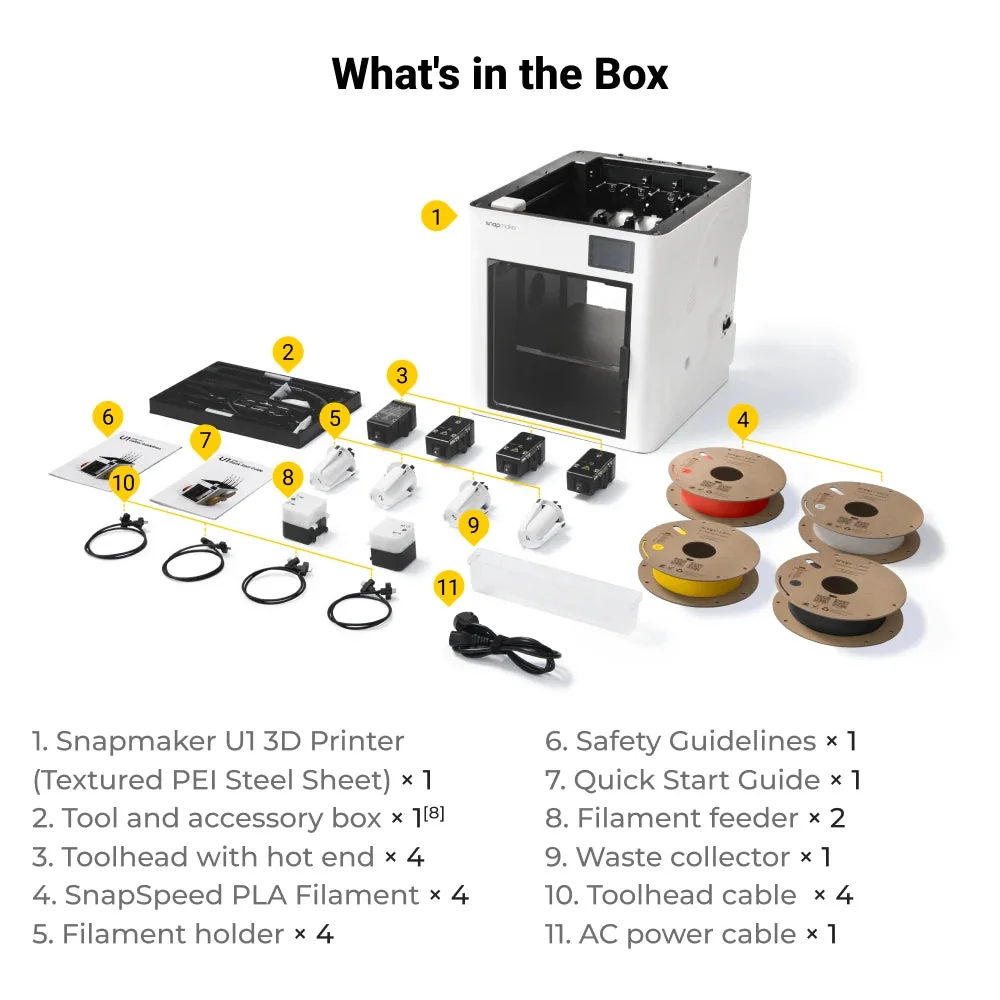
The retail package is complete rather than minimal: the printer with a textured PEI steel sheet, all four toolheads with hotends, four spools of Snapmaker’s SnapSpeed PLA in different colors so multi-color printing works on day one, four filament holders, two filament feeders, a waste collector for the small primes each head produces, a tool and accessory box, toolhead cables and documentation. The top cover is the notable extra you may want to add at checkout.
Who it is for, and who should wait
- A strong fit: anyone printing multi-color models regularly who is tired of purge waste; functional part makers who want soluble supports or rigid-plus-flexible assemblies without changing nozzles; small print farms where a five-second swap replaces minutes of purging on every job.
- A reasonable fit: single-color users who want a fast CoreXY machine and like the idea of keeping a second material permanently loaded. You will pay for capacity you use rarely, but the base machine is competitive on its own.
- Should wait or look elsewhere: people who print mostly ABS or nylon and do not want to add the cover; anyone who wants a sealed, filtered enclosure out of the box; and anyone for whom four hotends’ worth of maintenance is a deal-breaker rather than an accepted cost.
Snapmaker sells the U1 through its own US and EU web stores, with regional pricing and promotions that change over time; the link below goes to the store for your region. As with any sponsored placement, our recommendation is to read independent long-term reviews alongside this overview before ordering.
See the Snapmaker U1 at the official store →
Frequently asked questions
Does the Snapmaker U1 need a purge tower for multi-color prints?
No. Each color or material has its own toolhead and nozzle, so there is no melt zone to flush between changes. The heads perform a short prime into a waste collector when they are picked up, which produces a fraction of the material a purge tower or wipe tower uses.
Can I print ABS or nylon on the U1?
The hotends are rated for engineering materials, but the frame is open at the top by default. Snapmaker offers an optional top cover for high-temperature materials, and for ABS, ASA or nylon you should plan on using it to control warping and fumes.
How many toolheads does the U1 come with, and can I add more?
Four toolheads ship in the box and four is the maximum the dock supports. There is no expansion to additional heads; the four slots can be loaded with any combination of colors and materials.
Is the toolhead offset calibration automatic?
Yes. The U1 measures XY offsets between toolheads automatically, alongside automatic pressure advance tuning, vibration compensation and first-layer calibration, so the manual print-and-measure loop used on older toolchangers is not required.