Print farm software is a dashboard that sits above several 3D printers and lets you monitor them, send jobs and manage a queue from one screen instead of walking from machine to machine. The right tool depends mostly on what your printers already run: Bambu Lab machines have Bambu Farm Manager, Prusa printers have Prusa Connect, Klipper printers can be grouped in Mainsail, and mixed fleets need a brand-neutral layer such as FDM Monster, Obico or SimplyPrint.
Make two decisions before you compare features. First, local or cloud: local tools keep files on your network, cloud tools are easier to reach from anywhere. Second, one brand or many: a maker’s own software is usually the smoothest for its printers and useless for anything else. The features below come from each project’s own documentation or repository, linked at the end. We avoid prices because plans change often; check the vendor’s page before you commit.
The consumer toolchanger 3D printer: the SnapSwap 4-toolhead system swaps heads in 5 seconds for true multi-color and multi-material printing, with smart calibration and auto filament loading.
- 4 toolheads · 5 s swap
- Up to 500 mm/s · 20,000 mm/s²
- 270 mm cube build volume
- Multi-color & multi-material

Quick decision list
- All Bambu Lab, want to stay off the cloud: Bambu Farm Manager (Windows server on your LAN).
- All Prusa: Prusa Connect for the farm view, PrusaLink on each printer for local control.
- All Klipper, a handful of machines: Mainsail’s multi-printer view may be all you need.
- Mixed fleet, self-hosted: FDM Monster (OctoPrint, Klipper via Moonraker, PrusaLink, Bambu in LAN mode).
- Mixed fleet, want a hosted service with a queue and AI failure detection: SimplyPrint or Obico.
- Existing OctoFarm setup: it still works, but check the project’s activity before building on it (see below).
Print farm software compared
| Tool | Printers it talks to | Where it runs | Farm features (per its docs) | Status as of 2026 |
|---|---|---|---|---|
| Bambu Farm Manager | Bambu Lab only (H2, X1, P1, P2S, A1 and other listed models, minimum firmware per model) | Server and client on Windows 10+ (x86-64), same LAN as printers | Live status, batch operations, job queue, firmware upgrades, multi-user, printer tags, staggered print start | Server 03.00.00.00 listed on the wiki |
| Prusa Connect | Prusa printers with PrusaLink (built in on CORE One, MK4/S, MK3.9, MK3.5, XL, MINI; Raspberry Pi add-on for MK3/S/+ and MK2.5/S) | Prusa cloud | Farm overview, per-printer tracking, production statistics; free for Prusa owners with 1 GB cloud storage | Active |
| Mainsail | Klipper printers via Moonraker | Web interface on each printer’s host | Control and monitor several printers from one interface | Active (v2.19.0, August 2026) |
| FDM Monster | OctoPrint, Klipper (Moonraker), PrusaLink, Bambu Lab in LAN mode | Self-hosted: Docker, MonsterPi image, Linux script | Printer grid, batch printing one file to several printers, drag-and-drop G-code, file thumbnails, webcams, maintenance mode | Active (2.1.1, May 2026), AGPL-3.0 |
| Obico | OctoPrint and Klipper/Moonraker | Hosted at obico.io or self-hosted with Docker | Remote monitoring and deep-learning failure detection; self-hosting works on modest PCs, a GPU is optional | Active, AGPL-3.0 |
| SimplyPrint | Many brands, connected directly, through its client or through a Raspberry Pi | Cloud | Print queue, AI failure detection, browser-based slicing, filament tracking, team permissions; a free plan exists | Active |
| OctoFarm | OctoPrint instances | Self-hosted | One dashboard for many OctoPrint instances | Last release v1.7.3 (October 2022); repository last updated May 2023 |
Brand software: Bambu Farm Manager and Prusa Connect
Bambu Farm Manager is two programs: a server that connects to and controls printers on your local network, and a client that team members open to watch and manage the farm. According to Bambu Lab’s wiki, commands and model files travel to the printers only inside your network, over an encrypted channel. A few requirements catch people out:
- The server runs on Windows 10 or later with a 64-bit x86 processor; no Mac or Linux server.
- Printers join the network over 2.4 GHz Wi-Fi, and server, client and printers must reach each other by IP address.
- Before adding a printer you update its firmware, unbind it from Bambu Handy and switch LAN-only mode off on the printer.
- The client still needs internet access for server activation, printer verification and firmware downloads.
- Jobs are uploaded as sliced
gcode.3mffiles exported from Bambu Studio, and the wiki notes only single-plate files are supported.
One setting worth turning on: during activation you can enable staggered print start, which the wiki describes as a way to prevent power overloads when many printers heat their beds at once.
Prusa Connect is Prusa’s cloud service, available from connect.prusa3d.com, PrusaSlicer and the Prusa app. Prusa describes it as able to control entire print farms while tracking each printer separately. The local counterpart, PrusaLink, handles monitoring, uploads and print control on your network without internet access. Newer Prusa printers have PrusaLink built in; the MK3 family and MK2.5 need a Raspberry Pi connected by USB or GPIO.
Klipper farms: Mainsail and Moonraker
Every Klipper printer already runs Moonraker, the API server behind Mainsail and Fluidd. Mainsail’s project page lists controlling and monitoring multiple printers from one interface as a feature, which covers a small Klipper farm without extra software. It does not give you a shared job queue that hands the next file to whichever printer is free. For that, point FDM Monster, Obico or SimplyPrint at the same Moonraker instances. Our Mainsail and Fluidd comparison covers remote access for these interfaces.
OctoPrint-based farms: OctoFarm, FDM Monster and Obico
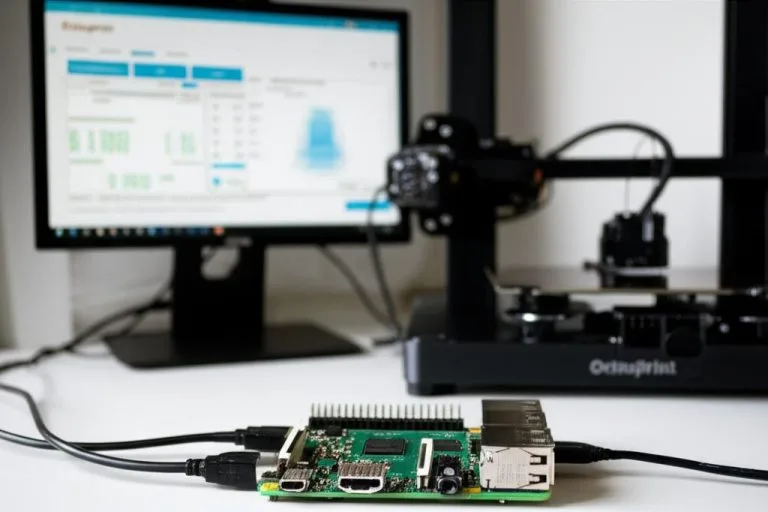
OctoPrint controls one printer per instance, so an OctoPrint farm is really a set of instances (one Raspberry Pi per printer is the usual pattern) with a dashboard on top. If you have not set up the first one yet, start with our OctoPrint setup guide.
- OctoFarm was the classic answer: a web server that unifies as many OctoPrint instances as you like. Its GitHub repository shows the latest release, v1.7.3, from October 2022 and no commits since May 2023, and its old documentation domain no longer serves the docs. It is not archived, but treat it as unmaintained until that changes.
- FDM Monster started in the same space and now also speaks Moonraker, PrusaLink and Bambu Lab LAN mode. It runs from a Docker image, a Raspberry Pi image called MonsterPi or a Linux install script, and stores its data in SQLite. Its batch print feature sends one G-code file to several selected printers, which is the core task of a farm making repeat parts.
- Obico (formerly The Spaghetti Detective) focuses on monitoring and AI failure detection for OctoPrint and Klipper. You can use the hosted service or run the open-source server yourself with Docker; the README says it runs on modest computers and uses an Nvidia GPU if you have one. Plugin-level failure detection for a single printer is covered in our guide to OctoPrint monitoring plugins.
Features that matter once you pass five printers
With two or three printers, any dashboard that shows status and a webcam is enough. As the farm grows, these features decide how much time you spend per job:
| Need | What to look for | Where it exists (per docs) |
|---|---|---|
| Print the same part on many machines | Batch send one file to selected printers | FDM Monster, Bambu Farm Manager |
| Keep printers busy without babysitting | Shared job queue | Bambu Farm Manager, SimplyPrint |
| Catch failures early | Camera per printer plus failure detection | Obico, SimplyPrint |
| Several operators | User accounts and permissions | Bambu Farm Manager, SimplyPrint |
| Know which filament is loaded where | Filament or spool tracking | SimplyPrint |
| Files must not leave the building | Local server, no cloud storage of jobs | Bambu Farm Manager, FDM Monster, self-hosted Obico, PrusaLink |
| Avoid tripping breakers | Staggered start of heating | Bambu Farm Manager |
The table only lists features we could confirm in each project’s own documentation. Other tools may have them too; test with two printers before you move the whole farm.
Common mistakes when setting up farm software
- Exposing printers to the internet to reach them remotely. Keep the printers and any self-hosted server on your LAN and use a VPN or the tool’s own cloud relay. OctoPrint’s developers warn that an exposed printer host can be made to heat without its safety checks.
- Building on an abandoned project. Check the date of the last release and commit before you invest a weekend in setup. Farm tools touch firmware, networks and file formats that change every year.
- Relying on Wi-Fi alone for a dense farm. Many printers streaming video on one access point slow each other down. Use Ethernet for servers and Raspberry Pis where you can, and keep webcam resolution modest.
- Treating remote monitoring as fire protection. A camera shows you a problem; it does not stop one. Smoke alarms, working thermal runaway protection and a plan for overnight runs still apply, as covered in our 3D printer fire safety guide.
- Skipping the business case. Software is only part of what a farm costs. Our guide to 3D printer ROI shows how to work out cost per part.
Frequently asked questions
Can OctoPrint manage several printers on its own?
No. One OctoPrint instance controls one printer. For a farm you run one instance per printer, usually on separate Raspberry Pis, and add a dashboard such as FDM Monster or Obico to see them together.
Is there free print farm software?
Yes. FDM Monster, Obico’s self-hosted server and Mainsail are open source, and Prusa Connect is free for Prusa owners. SimplyPrint advertises a free plan and Obico runs a hosted service; check their current limits on their websites, as plans change.
Can I manage Bambu Lab and Prusa printers from one dashboard?
Yes, with a brand-neutral tool. FDM Monster lists Bambu Lab (in LAN mode) and PrusaLink among its supported backends, and SimplyPrint connects many brands through the cloud. The makers’ own tools, Bambu Farm Manager and Prusa Connect, only manage their own printers.
Is OctoFarm still maintained?
As of September 2026, its GitHub repository shows the last release, v1.7.3, in October 2022 and the last commit in May 2023. Existing setups keep working, but for a new farm a project with recent releases is the safer choice.