ABS warps and cracks because it shrinks as it cools, and the edges and upper layers cool faster than the rest of the part. The fix is to keep the whole print warm and cool it slowly. Use an enclosed printer, a bed at 90–100 °C, a nozzle in the 240–270 °C range your spool specifies, and the part cooling fan off or very low. Add glue on a PEI sheet, a brim, no drafts and dry filament.
This guide gives the published settings from Prusa, Bambu Lab and Polymaker side by side, explains what an enclosure has to achieve, and ends with a symptom-by-symptom fix table. Always start from the values on your own spool’s label or data sheet, because ABS blends differ.
The consumer toolchanger 3D printer: the SnapSwap 4-toolhead system swaps heads in 5 seconds for true multi-color and multi-material printing, with smart calibration and auto filament loading.
- 4 toolheads · 5 s swap
- Up to 500 mm/s · 20,000 mm/s²
- 270 mm cube build volume
- Multi-color & multi-material

ABS warping checklist
- Dry the filament if the spool has been open (Bambu Lab: 80 °C for 8 h; Polymaker: 70 °C for 6 h).
- Wash the build plate with warm water and dish soap, then apply a thin, even layer of glue stick.
- Close the enclosure and let the heated bed warm the chamber before you start.
- Set the bed to 90–100 °C and the nozzle to your spool’s range.
- Turn the part cooling fan off for at least the first layers.
- Add a brim or brim ears, keep infill at 50% or below, and keep the printer away from drafts.
Why ABS warps and cracks
Bambu Lab explains warping as thermal shrinkage: the outer edges cool faster than the centre, and the tension pulls the corners up. It ranks ABS among the more shrinkage-prone filaments, after PC and nylon but ahead of ASA, PETG and PLA. Cracks between layers have the same cause. The stress from cooling becomes greater than the bond between layers.
Bambu Lab’s data sheet shows how weak that bond is: impact strength is 39.3 kJ/m² along the layers but only 7.4 kJ/m² across them (Z direction). Prusa adds that ABS parts shrink by around 1–2% after cooling, so a part can come out slightly undersized even when it doesn’t warp.
ABS temperature, fan and bed settings
| Setting | Prusa (generic ABS) | Bambu Lab ABS (TDS) | Polymaker PolyLite ABS (TDS) |
|---|---|---|---|
| Nozzle | 255 °C | 240–270 °C | 245–265 °C |
| Bed | 100 °C; 80–110 °C depending on part size | 80–100 °C | 90–100 °C |
| Part cooling fan | Not stated | 0–80% | Off |
| Chamber | Enclosure with higher ambient temperature | 45–60 °C | Enclosure needed |
| Build surface | Smooth or powder-coated PEI with glue stick | Engineering, High Temp or Textured PEI plate, with glue | PC or textured PEI, glue when needed |
| Drying | Not stated | 80 °C, 8 h (forced-air oven) | 70 °C, 6 h |
| Heat resistance | Not stated | HDT 87 °C at 0.45 MPa | HDT 100 °C at 0.45 MPa; Tg 101 °C |
Nozzle temperature. Start in the middle of your spool’s range and print a temperature tower. Bambu Lab’s cracking table points to under-extrusion as one cause of layer splits, fixed by raising the nozzle temperature or slowing down.
Bed temperature. Prusa recommends higher bed temperatures for larger objects. On printers without active chamber heating, a hotter bed also warms the chamber, according to Bambu Lab. Bambu Lab’s troubleshooting table suggests raising it by 10–15 °C for ABS corners that lift. Stay within the filament and plate limits.
Cooling fan. The data sheets disagree: Polymaker says off, while Bambu Lab allows up to 80% for its own ABS on its enclosed machines. Bambu Lab’s warping guide recommends no cooling for the first 3 layers. On a printer without a heated chamber, start with the fan off and add a little only if overhangs or bridges need it. That is a starting point, not a published figure.
What an enclosure needs to do for ABS
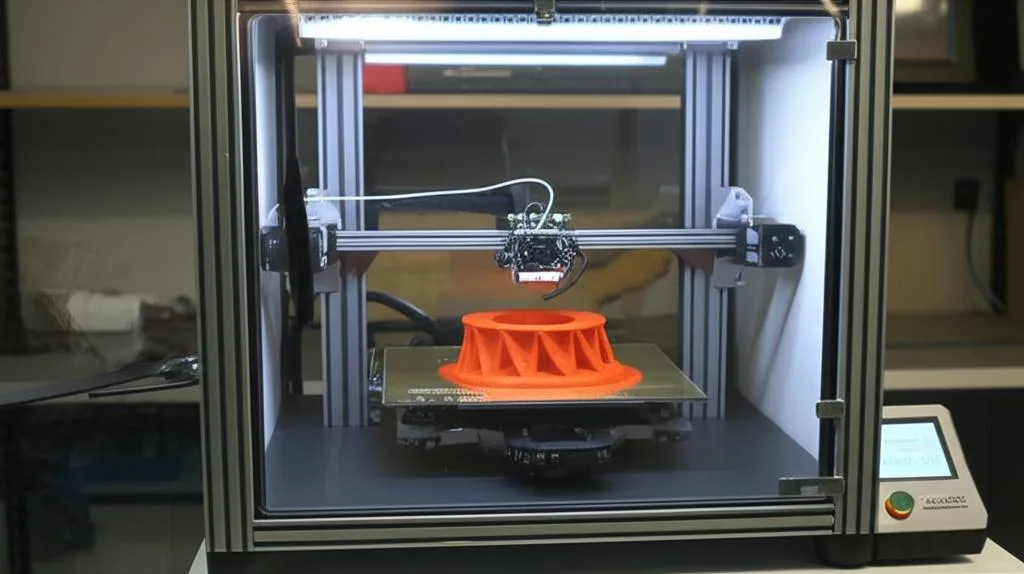
Polymaker lists an enclosure as needed for PolyLite ABS, and Bambu Lab’s warping guide says large flat ABS parts will almost always warp without one. What the enclosure has to deliver:
- Warm, still air. Bambu Lab’s data sheet gives a 45–60 °C chamber. Its troubleshooting table says 40 °C or more, with all doors and the top cover closed.
- A warm-up before printing. Without active chamber heating, Bambu Lab tells X1C and P1S owners in a cold room to heat the bed to its maximum and wait 15 minutes before starting. A similar pre-heat is a reasonable starting point on other enclosed printers.
- No drafts. An open window, air-conditioning vent or desk fan can cool one side of the print. Bambu Lab also notes that in rooms below 20 °C even PLA and PETG can warp.
- Ventilation without a draft. ABS releases styrene when printed. Bambu Lab warns it can cause dizziness or nausea and advises against printing it in living areas such as bedrooms. Prusa’s advice is to ventilate the room but keep moving air away from the print. See ventilation and filtration for ABS fumes.
- Heat-tolerant printer parts. Prusa warns that printing inside an enclosure can deform the fan shroud and other plastic printer parts, and suggests reprinting them in a more heat-resistant material such as its PC Blend.
No enclosure yet? Turn on PrusaSlicer’s draft shield (in the Skirt and brim settings). Prusa describes it as a simple alternative that keeps the model slightly warmer and reduces warping. For building one, see our guide to making your own 3D printer enclosure.
Bed adhesion and slicer settings for ABS
- Clean plate, thin glue. Bambu Lab calls fingerprints and skin oils the most common cause of adhesion failure. Wash the plate with dish soap and don’t touch the surface afterwards. Apply glue in a thin, even layer, because thick blobs make the first layer uneven. If you’re choosing a sheet, compare PEI and glass build plates.
- Brim or brim ears. A brim adds contact area. Bambu Studio’s brim ears let you add it only at the corners that lift.
- Moderate infill and walls. More plastic means more shrinkage force. Bambu Lab recommends at most 50% infill and 6 walls, and says 2 walls with 15% infill is enough for most non-structural parts.
- Gyroid for large flat parts. Bambu Lab suggests gyroid at 25% or less, because grid and triangle patterns create straight lines of tension.
- Short layer times. Bambu Lab’s ABS/ASA/PC guide notes that the longer one layer takes, the weaker the bond to the next on small models, because the previous layer has cooled. Print small parts in smaller batches, or by object instead of by layer.
- Dry filament. Crackling or popping during printing, or a bubbly, stringy surface, means the filament has absorbed moisture.
ABS warping and cracking: symptoms and fixes
| Symptom | Likely cause | Fix |
|---|---|---|
| Corners lift in the first few layers | Dirty plate, no glue, bed too cool, fan on | Wash plate, thin glue layer, bed +10–15 °C within limits, fan off for the first 3 layers, brim ears |
| Corners lift halfway up; ripple line on the side | Chamber too cool or a draft | Close doors and lid, pre-heat the chamber, block airflow around the printer |
| Horizontal cracks between layers on tall parts | Cooling stress greater than layer bond | Reduce fan, raise bed temperature and keep the enclosure closed; if under-extruding, raise nozzle temperature or slow down |
| Large flat part warps whatever you do | Shrinkage across a big footprint | Gyroid at 25% or less, fewer walls; without an enclosure, Bambu Lab suggests PLA or PETG instead |
| Bubbles, popping sounds, rough surface | Wet filament | Dry at the manufacturer’s setting (70–80 °C for 6–8 h in the data sheets above) |
| Part slightly smaller than the model | Normal ABS shrinkage of about 1–2% | Print a test piece, measure it and scale the model |
| Printer’s own plastic parts sag in the enclosure | Chamber heat | Reprint those parts in a higher-temperature material |
When ABS still won’t cooperate: next steps
- Consider ASA or PETG. Prusa describes ASA as the successor to ABS, with less warping and odour and better UV resistance; Bambu Lab still lists it as needing an enclosed printer. If you don’t need ABS’s heat resistance, ABS versus PETG helps you decide.
- Anneal carefully, if at all. For its ABS, Bambu Lab suggests 80–90 °C for 6–12 hours. It warns that parts can deform or warp, and says to use a forced-air oven with even heating, not a microwave or kitchen oven.
- Finish the surface. ABS can be smoothed with acetone vapour, as Prusa notes. Our acetone vapour smoothing guide covers the process and safety.
- Don’t fix a mechanical problem with temperature. If only one area of the bed lifts, check the first layer and bed levelling before raising temperatures further.
Frequently asked questions
Can you print ABS without an enclosure?
Small parts sometimes work, but it is unreliable. Polymaker lists an enclosure as needed for its ABS, and Bambu Lab says large flat ABS parts almost always warp without one. If you have to try, block all drafts, use a brim and a hot bed, and turn on PrusaSlicer’s draft shield.
What bed temperature is best for ABS?
Most data sheets land between 90 and 100 °C. Prusa recommends 100 °C and allows 80–110 °C depending on part size, with larger parts needing more. Use glue on PEI and match the value to your spool’s data sheet.
Should the cooling fan be on or off for ABS?
Off, or very low, especially for the first layers. Polymaker specifies the fan off, and Bambu Lab recommends no cooling for the first 3 layers. Too much fan is one of the causes Bambu Lab lists for cracks between layers.
Is it safe to print ABS indoors?
ABS releases styrene while printing. Bambu Lab warns it may cause dizziness or nausea and advises against printing it in bedrooms or living rooms. Print in an enclosed printer with filtration or exhaust, and ventilate the room without blowing air across the print.