Few things are as frustrating in 3D printing as watching your meticulously prepared print begin to lift and curl away from the build plate. This common scourge, known as print warping or bed adhesion failure, manifests as the corners of your print peeling up, often leading to a ruined model or even a failed print job. It’s a persistent headache for both newcomers and seasoned makers alike, but understanding its root causes is the first step towards achieving consistently perfect first layers and flawless prints.
This comprehensive guide will delve into the mechanics of print warping, explore the most common culprits behind bed adhesion failure, and equip you with a definitive arsenal of fixes to keep your prints firmly rooted where they belong.
Understanding print warping: the science behind the curl
At its heart, print warping is a battle against physics, specifically thermal expansion and contraction. Most 3D printing filaments, like ABS, PETG, and even PLA to some extent, shrink as they cool. When a hot layer of plastic is extruded onto a cooler build plate, it immediately begins to cool and contract. If the adhesion between the first layer and the print surface isn’t strong enough to counteract these internal stresses, the plastic will pull itself inwards, causing the edges or corners of your print to lift – this is the dreaded corner lift.
The problem is exacerbated with larger prints, materials with higher shrinkage rates (e.g., ABS, Nylon), and significant temperature differences between the print and its environment. Effectively, your print is fighting to become smaller, and if the bed can’t hold it, it will warp.
Common causes of bed adhesion failure and print warping
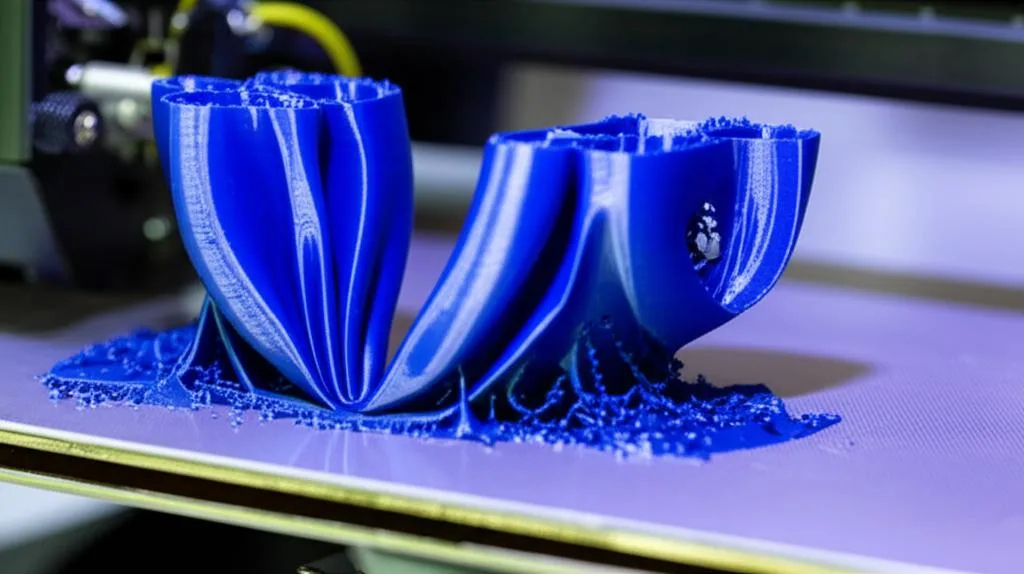
Before diving into solutions, let’s identify the usual suspects behind poor bed adhesion. Often, it’s a combination of factors rather than a single issue.
Improper bed leveling and Z-offset calibration
- Too high: If your nozzle is too far from the bed, the filament won’t be pressed down enough to bond effectively. It might look like thin, wispy lines or spaghetti.
- Too low: A nozzle too close can scrape the bed, prevent proper extrusion, or create an overly squished first layer that’s prone to tearing or poor flow.
Incorrect bed temperature for the filament
Each filament type has an optimal bed temperature. If the bed is too cold, the plastic will cool too rapidly, leading to excessive shrinkage and warping. If it’s too hot, some materials might become too soft, leading to “elephant’s foot” or difficult removal.
Dirty or contaminated print surface
Fingerprints, dust, oil, or residue from previous prints can create a microscopic barrier, preventing the plastic from bonding properly with the build plate. Even seemingly clean surfaces can harbor adhesion-killing contaminants.
Inappropriate or worn-out build surface
Not all build surfaces are created equal. Some materials require specific surfaces for optimal adhesion. A worn-out or damaged print surface can also lose its adhesive properties over time.
Drafts and ambient temperature fluctuations
Sudden drafts from open windows, air conditioning, or even people walking by can cause uneven cooling of your print, leading to localized shrinkage and severe warping. A cold ambient room temperature can also make it harder to maintain a stable print environment.
Suboptimal first layer print settings
- Too fast: Printing the first layer too quickly doesn’t allow enough time for the plastic to properly adhere and bond.
- Insufficient extrusion: If not enough plastic is laid down, the lines won’t squish together or onto the bed effectively.
- Excessive fan cooling: Cooling on the first layer can cause rapid contraction, especially with materials prone to warping.
Filament type and quality
Some filaments are inherently more prone to warping than others. ABS and Nylon are notorious for their high shrinkage rates, while PLA is generally more forgiving. Poor quality filament with inconsistent diameter or additives can also contribute to adhesion issues.
Definitive fixes for bed adhesion failure and print warping
Tackling print warping requires a systematic approach. Here’s a rundown of the most effective strategies.
1. Master your bed leveling and Z-offset
- Manual leveling: Use a feeler gauge or a piece of paper (typically 0.1mm thickness) to ensure the nozzle is equidistant from the bed at multiple points. Aim for a slight drag.
- Automatic bed leveling (ABL): If your printer has ABL, ensure it’s calibrated correctly. Run the mesh generation before each print for best results.
- Z-offset calibration: This is crucial. Adjust your Z-offset in minute increments (0.01-0.02mm) during a test print (e.g., a single-layer square) until the first layer is perfectly squished – not too thin, not too thick. The lines should bond together seamlessly with no gaps or ridges.
2. Optimize your print surface
- Cleanliness is paramount: Regularly clean your print surface. For most surfaces (PEI, glass), isopropyl alcohol (IPA) is excellent. For stubborn grime or oils, a thorough wash with dish soap and warm water, followed by a rinse and air dry, can work wonders. Avoid touching the surface directly after cleaning.
- Choose the right surface:
- PEI (Ultem) sheets: Excellent all-rounder for PLA, PETG, and many others. Available in smooth and textured variants.
- Glass: Affordable and flat, often used with adhesives.
- Magnetic flexible plates: Convenient for print removal. Often come with PEI or similar coatings.
- G10/Garolite: Great for Nylon and other tricky materials.
- Specialized coatings: Wham Bam PEX, BuildTak, and similar surfaces offer enhanced adhesion for specific materials.
- Adhesives: When extra grip is needed:
- PVA glue stick (e.g., Elmer’s, Pritt): Works well for PLA on glass. Apply a thin, even layer.
- Hairspray (e.g., Aqua Net Extra Hold): Popular for ABS and PETG on glass. Apply a light mist.
- ABS slurry/juice: Dissolve a small amount of ABS filament in acetone. Apply a very thin layer to a glass bed (use in a well-ventilated area).
- Magigoo or other specialized adhesion solutions: Designed for specific filament types, offering reliable adhesion and easy release when cool.
3. Dial in your temperature settings
- Heated bed temperature: Refer to your filament manufacturer’s recommendations, but be prepared to experiment. Increase the bed temperature slightly (5-10°C) if warping persists. For materials like ABS, a bed temperature of 100-110°C is common. For PLA, 50-60°C is typical.
- Nozzle temperature: Ensure your nozzle temperature is within the recommended range. Too cold can lead to poor layer adhesion, while too hot can cause stringing or oozing.
- Enclosure temperature: For high-warp materials like ABS or Nylon, a heated enclosure can significantly reduce warping by keeping the ambient temperature around the print consistently warm, slowing down cooling and reducing thermal stress.
4. Optimize first layer specific slicer settings
- First layer speed: Reduce it significantly (e.g., 10-25 mm/s). This gives the plastic more time to bond.
- First layer line width/extrusion multiplier: Increase the first layer line width (e.g., 120-150% of nozzle diameter) or slightly increase the extrusion multiplier (e.g., 105-110%) to lay down more material, creating a stronger bond.
- Initial layer height: While typically the same as subsequent layers, some users find a slightly thicker first layer (e.g., 0.24mm for a 0.2mm layer height) can improve adhesion.
- Cooling fan: For the first few layers (typically 3-5), turn the part cooling fan off completely, especially for materials like ABS, PETG, and Nylon. Rapid cooling is a primary cause of warping. For PLA, a low fan speed (10-30%) might be acceptable, but 0% is often safest for the first layer.
5. Control your printing environment
- Use an enclosure: This is the most effective solution for materials prone to warping. An enclosure helps maintain a stable, warm ambient temperature around the print, preventing drafts and uneven cooling. DIY solutions can be effective, or you can purchase purpose-built enclosures.
- Avoid drafts: Keep your printer away from open windows, doors, air conditioning vents, or any source of moving air.
- Room temperature: Try to keep your printing room at a stable, comfortable temperature.
6. Employ adhesion aids in your slicer
- Brim: A single-layer perimeter printed around the base of your part, increasing the surface area in contact with the bed. This is highly effective for reducing corner lift. Adjust the brim width and number of lines.
- Raft: A disposable base printed underneath your part. It creates its own flat surface for the print to adhere to, often used for very small contact areas or highly warped materials. However, rafts use more material and can leave a rougher finish on the bottom of your print.
- Skirt: While primarily used to prime the nozzle, a skirt can sometimes help warm up the immediate area around the print, though it offers minimal direct adhesion benefit.
7. Manage your filament
- Dry your filament: Hygroscopic filaments (e.g., Nylon, PETG, ABS, PVA) absorb moisture from the air. Moist filament can lead to poor layer adhesion, bubbling, and inconsistent extrusion, all of which can contribute to warping. Use a filament dryer or dehydrator, especially if you live in a humid environment.
- Store properly: Keep filaments in airtight containers with desiccant packs when not in use.
8. Advanced techniques and troubleshooting
- Corner tabs/mouse ears: In your CAD software, add small, thin circular or square pads to the corners of your model that are prone to warping. These can be easily removed after printing.
- Software anti-warping features: Some slicers offer experimental features that slightly lift the corners of the first layer or adjust speeds to mitigate warping.
- Firmware adjustments: For advanced users, adjusting settings like linear advance (pressure advance) can improve extrusion consistency, which in turn can aid first layer quality.
Conclusion
Print warping and bed adhesion failure are formidable foes in the world of 3D printing, but they are far from unconquerable. By systematically addressing potential causes – from meticulous bed leveling and cleaning to optimizing print settings and environmental control – you can significantly reduce, if not eliminate, these issues. Remember, troubleshooting is often a process of elimination. Start with the simplest fixes, make one change at a time, and observe the results. With patience and persistence, you’ll soon be achieving consistently strong first layer adhesion and prints that stay put, right down to the last layer.
Frequently asked questions
Can I use a glue stick on a PEI sheet, or will it damage the surface?
Using a glue stick on a smooth PEI sheet is generally not recommended as a routine practice, because the adhesive can permanently alter the surface texture and reduce its natural adhesion over time. If you need extra grip for a tricky material like PETG on smooth PEI, a thin layer of glue stick actually acts as a release agent to prevent the print from bonding too aggressively and damaging the sheet. For PLA on PEI, cleaning the surface with isopropyl alcohol is usually sufficient without any adhesive.
My prints are warping even with a brim. What should I check next?
If a brim isn’t stopping corner lift, the most common overlooked cause is a draft or temperature fluctuation in the room, which causes uneven cooling and shrinkage. Check that your printer is not near an open window, air conditioning vent, or hallway, and consider using an enclosure to stabilize the ambient temperature. Also verify that your bed temperature is at the higher end of the filament manufacturer’s recommended range, and confirm that your first layer fan speed is set to 0% for the first 3-5 layers.
Is it safe to leave a 3D printer printing overnight with a brim or raft?
Yes, it is generally safe to print overnight with a brim or raft, as these adhesion aids do not introduce any additional fire risk compared to a standard print. The primary safety concerns remain the same: ensure your printer has thermal runaway protection enabled in its firmware, place it on a non-flammable surface, and keep the area free of dust and flammable debris. A brim or raft simply increases the surface area contacting the bed, which reduces the chance of a failed print that could potentially cause a nozzle clog or other mechanical issue.