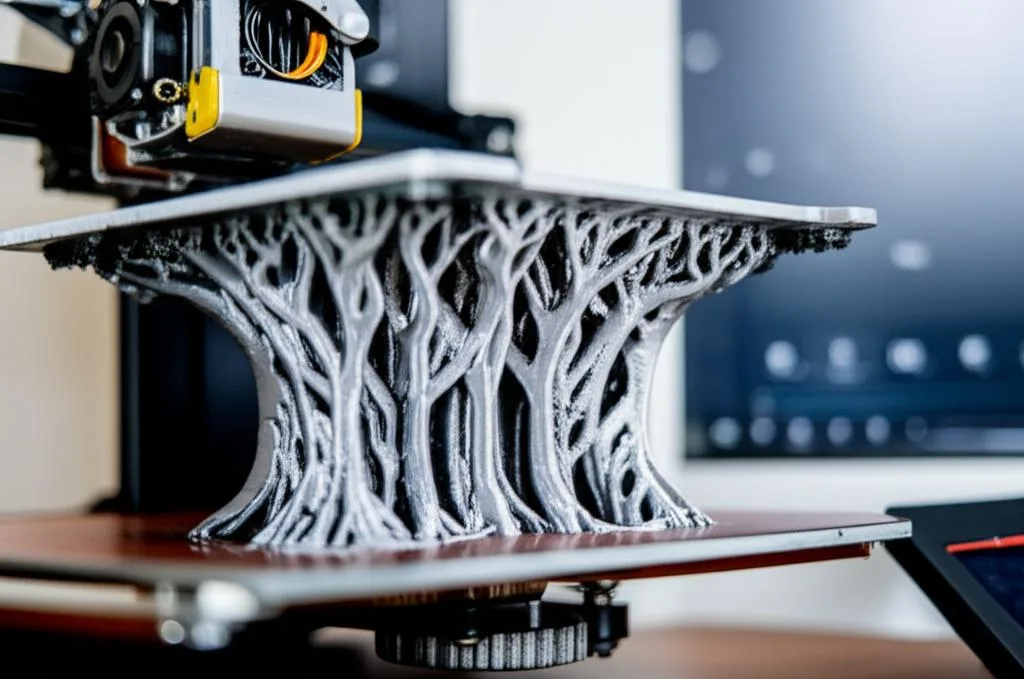
Tree supports have revolutionized the way we approach complex geometries in additive manufacturing. For anyone involved in 3D printing of tree supports, understanding their application can significantly improve print quality and efficiency. Unlike traditional, rectilinear supports, tree supports emulate organic growth, branching out from the build plate to provide support exactly where needed, minimizing contact with the printed part.
When to Opt for Tree Supports?
Tree supports are particularly effective for models with organic, non-flat overhangs, or intricate details where traditional supports might fuse or damage the surface. They excel in scenarios like:
- Organic Shapes: Models with curves, spheres, or irregular contours where a traditional grid might be inefficient or leave marks.
- Minimal Contact Points: If you need to support an overhang with as little material and contact as possible, tree supports are ideal, leading to easier removal and a cleaner finish.
- Material Saving: Often, tree supports use less filament compared to their conventional counterparts because they only build up where necessary, rather than forming a dense scaffold.
- Easier Removal: Their sparse contact points and branching structure generally make them much easier and faster to remove, often snapping off cleanly with minimal post-processing.
Effective Slicer Settings and Calibration
To master 3D printing of tree supports, proper configuration in your slicer software (like Cura or PrusaSlicer) is crucial. Key settings to adjust include:
- Support Angle: This determines the angle at which your model requires support. Typically, 45-60 degrees is a good starting point.
- Branch Angle/Diameter: These settings control how wide and steep the tree branches grow. Experimenting here can fine-tune stability and ease of removal.
- Support Z Distance: This gap between the top of the support and the bottom of your print is critical for easy removal. Too small, and it sticks; too large, and the print sags.
- Support X/Y Distance: Defines the horizontal distance from the print, ensuring the support doesn’t fuse with the model’s sides.
A successful Calibration and Settings routine is paramount. After setting your initial support parameters, print small test models to assess adhesion, removal ease, and surface quality. Adjust print speed, nozzle temperature, and even layer height as needed. For example, slightly higher temperatures might improve layer adhesion for the supports themselves, while a lower print speed for the supported layers of your model can enhance surface quality.
Troubleshooting Common Issues
Even with optimal 3D printing tree supports settings, you might encounter issues. If supports detach from the build plate, ensure proper bed adhesion (clean bed, correct temperature, adhesive if needed). If they are too difficult to remove or leave marks, adjust your Z-distance and X/Y distance settings, or consider a different interface layer pattern if your slicer allows it. Sometimes, enabling “Print thin walls” for supports can help with stability.
Conclusion
Integrating tree supports into your 3D printing workflow can significantly enhance the success rate of complex prints, reduce material waste, and streamline post-processing. By carefully configuring your slicer’s Calibration and Settings and understanding when to deploy these organic structures, you’ll unlock a new level of efficiency and quality in your 3D printing endeavors. Don’t be afraid to experiment with the settings; each printer and filament type might require unique adjustments for the best results.
Frequently asked questions
Do tree supports work with every 3D printer and slicer?
No. Tree support generation is a slicer feature, not a printer feature, so you need software like Cura or PrusaSlicer that includes it, along with the corresponding Support Angle, Branch Angle/Diameter, and Z/X/Y distance settings. Most modern FDM printers can print the resulting branching geometry without issue, since the branches are just standard printed structures rather than anything requiring special hardware.
Why are my tree supports leaving marks or damaging the surface of my print?
This usually comes down to the Support Z Distance and Support X/Y Distance settings being too tight, causing the support to fuse slightly with the model surface. Increase the Z distance so the gap between the support tops and the print is larger, and adjust the X/Y distance so supports sit further from the model’s sides. If marks persist, try a different interface layer pattern if your slicer offers one, or run a small calibration test print to dial in the settings before committing to a full print.
Are tree supports always a better choice than traditional grid supports?
Not always, but they’re the better default for organic shapes, curves, and models with intricate overhangs, since they use less material and remove more cleanly than a dense rectilinear scaffold. Traditional supports still make sense for flatter, more geometric overhangs where a grid pattern provides straightforward, predictable contact. The best approach is to match the support style to the geometry: use tree supports for irregular contours and minimal-contact needs, and fall back to standard supports where a simple grid does the job just as well.