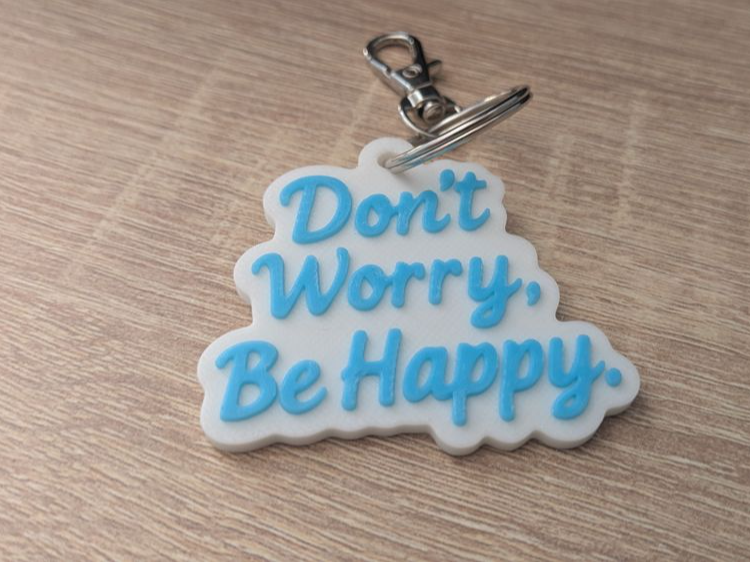
Keychain "Don't worry, be happy"
Keychain “Don’t Worry, Be Happy.” A stylish, three-dimensional keychain featuring a handwritten motto to remind you every day to stay calm and smile. Features: Dimensions: 55.00 × 50 × 4.00 mm Shape: Irregular outline precisely following…
Files are hosted by the publisher — 3DX does not serve them directly. The link opens the model page in a new tab.
About this model
Keychain “Don’t Worry, Be Happy.”
A stylish, three-dimensional keychain featuring a handwritten motto to remind you every day to stay calm and smile.
Features:
- Dimensions: 55.00 × 50 × 4.00 mm
- Shape: Irregular outline precisely following the text silhouette
- Text: Embossed letters in dark blue, raised approximately 1 mm above the surface
- Attachment: Built-in hole for a steel split ring for quick fastening
- Printing: For print without an AMS system—apply the color change on layer 17
Print settings
These are the settings the model was actually printed and tested with — the profile in the 3MF is already set up this way, so you can send it straight to the printer.
- Layer height: 0.2 mm
- Nozzle: 0.4 mm
- Walls: 2
- Infill: 15 %
- Filament: ~9 g
Files
The model is free on MakerWorld and ships as a ready-to-print 3MF with the print profile inside — no slicer setup needed. Hit the download button above; the file is hosted there, not on 3DX.