Fidget Spinner Pack — 5 Designs
Five spinners that need nothing but a printer. No glue, no metal bearings, no snap tabs — everything is press-fit, and the bearing itself is printed: a barrel bushing riding on a 9.5 mm axle.
Files are hosted by the publisher — 3DX does not serve them directly. The link opens the model page in a new tab.
About this model
Five silhouettes — Aero, Hexa, Orbit, Xframe and Dual — built on one shared center that was tuned over a long run of test prints. The point of the pack is what it doesn’t need: no glue, no bought bearings, no thin snap tabs that break the first time you push them home.
The spin comes from the print itself. A printed barrel bushing rides on a 9.5 mm axle over a narrow contact band, so friction stays low and the spin runs long. Two halves are clamped by a pair of bushings pressed into one another — two flanges grip the body like a rivet.
How it goes together
- Two body halves. For Aero, Hexa, Xframe and Dual that is one file printed twice; Orbit has swept arms, so its top half is a separate mirror part — both are already on the plate.
- Press the clamp bushing into the bore.
- From the other side, press the bearing insert into it.
- Press an arm cap onto each tip.
- Axle through the middle, press the cap on (5 mm peg). Spin — the fit beds in after a few turns.
AMS or no AMS — both are in the file
Each single-spinner 3MF carries four plates. Plate 1 is the whole spinner in color, with the three filaments already mapped to the AMS slots. Plates 2–4 are the same set split one color per plate.
If you have an AMS you can print everything from plate 1 in one go — but running the single-color plates separately is noticeably faster, because the printer never switches filament mid-print: no purge tower, nothing flushed away. If you don’t have an AMS and still want it in color, print each color from its own plate and swap the filament between plates. Same result.
Printing notes
- No supports anywhere — every part sits flat on the bed.
- The arm caps ship with a brim (3 mm, outer only). They are tall with a small footprint and will pop off a bare plate. Keep the brim on; it peels off with a fingernail.
- Every design fits a 180 mm plate (A1 mini). A 256 mm version for A1 / P1 / X1 is included as well.
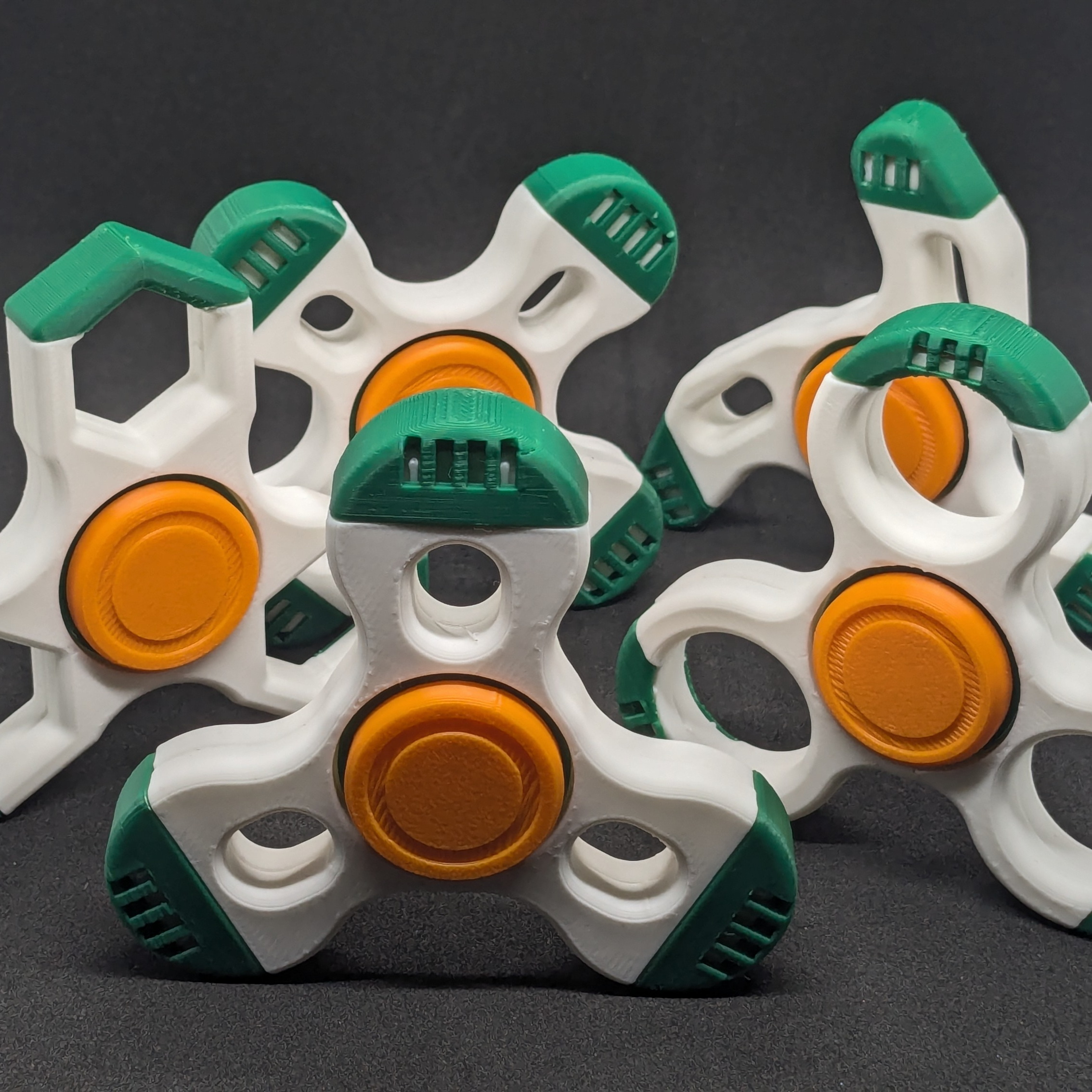
- Filaments in the photos (Bambu PLA Basic): Jade White 10100 (body), Orange 10300 (axle + cap), Mistletoe Green 10502 (arm caps + bushing).
- PETG works too and gives a slightly smoother spin; PLA is plenty.
Xframe, Dual and Orbit assembled in parallel — same mechanism, three different bodies, all landing on the spin at the same moment.
What’s in the pack
- 5 designs — Aero, Hexa, Orbit, Xframe, Dual
- Single-spinner 3MF for A1 mini and for A1 / P1 / X1 — each with the AMS and the no-AMS plates
- Full Pack: all five designs, one complete spinner per plate
- Documented fits, so it is a usable base for a remix
Frequently asked questions
How much filament does each spinner use?
Each complete spinner uses roughly 15–20 grams of PLA depending on the design (the solid-arm Orbit is heavier than the open Xframe). A full pack of all five spinners totals about 85–100 grams — well under a single 1 kg spool, so you can print the whole set from one roll of the main body color.
Can I use a different layer height, like 0.16 mm for smoother spin?
0.2 mm layer height is the tested profile and gives the correct press-fit tolerances. Going to 0.16 mm may make the barrel bushing and axle too tight because each layer is thinner, and the parts may not spin freely. If you want a smoother feel, switch to PETG at the same 0.2 mm setting — the article notes PETG gives a slightly smoother spin.
What if the press-fit is too tight or too loose after printing?
If the axle won’t turn at all, spin it vigorously by hand for 10–15 seconds — the article says the fit beds in after a few turns and loosens up. If it is too loose (wobbles), the most likely cause is over-extrusion; calibrate your filament flow rate and reprint only the bushing and axle parts, which use less than 2 grams total.